Headache Log App Guide How to Track and Forecast Migraines
Learn how to choose, set up, and use a headache log app to track migraine severity, triggers, and predict attacks using health and environmental data.
In this guide
If you're staring at your phone during a rough day and wondering whether a headache log app is worth the effort, the short answer is yes. The right app can help you track attacks, spot patterns, and, if it blends your history with environmental data, give you a better sense of when your risk is rising before a migraine fully hits.
That matters because migraine isn't just a “bad headache.” It's a neurological condition that can include aura (temporary visual or sensory changes before an attack), photophobia (light sensitivity), nausea, sound sensitivity, dizziness, and a wiped-out postdrome after the pain phase ends. A plain symptom note in your phone can help, but a structured diary does much more.
Research supports that structure. In a 6-month study of a migraine smartphone app, 67.7% of 238 participants were still actively using the app after 24 weeks, and users logged on about 77% of days. The most-used features were the headache and trigger diaries, which reinforces that self-monitoring is the core function people rely on most in migraine apps, according to a study on migraine app adherence and diary use. This article is for informational purposes and is not medical advice. Consult a healthcare provider for personalized guidance.
If you have a sudden severe headache, a headache with fever or stiff neck, new neurological changes, or a headache after a head injury, seek immediate medical care.
Choosing the Right Headache Log App
A good headache log app should make it easier to answer practical questions: What happened, when did it start, what symptoms showed up, what did you take, and what was going on around you that day?
The strongest apps don't just let you type “migraine today.” They help you log the details that matter over time.
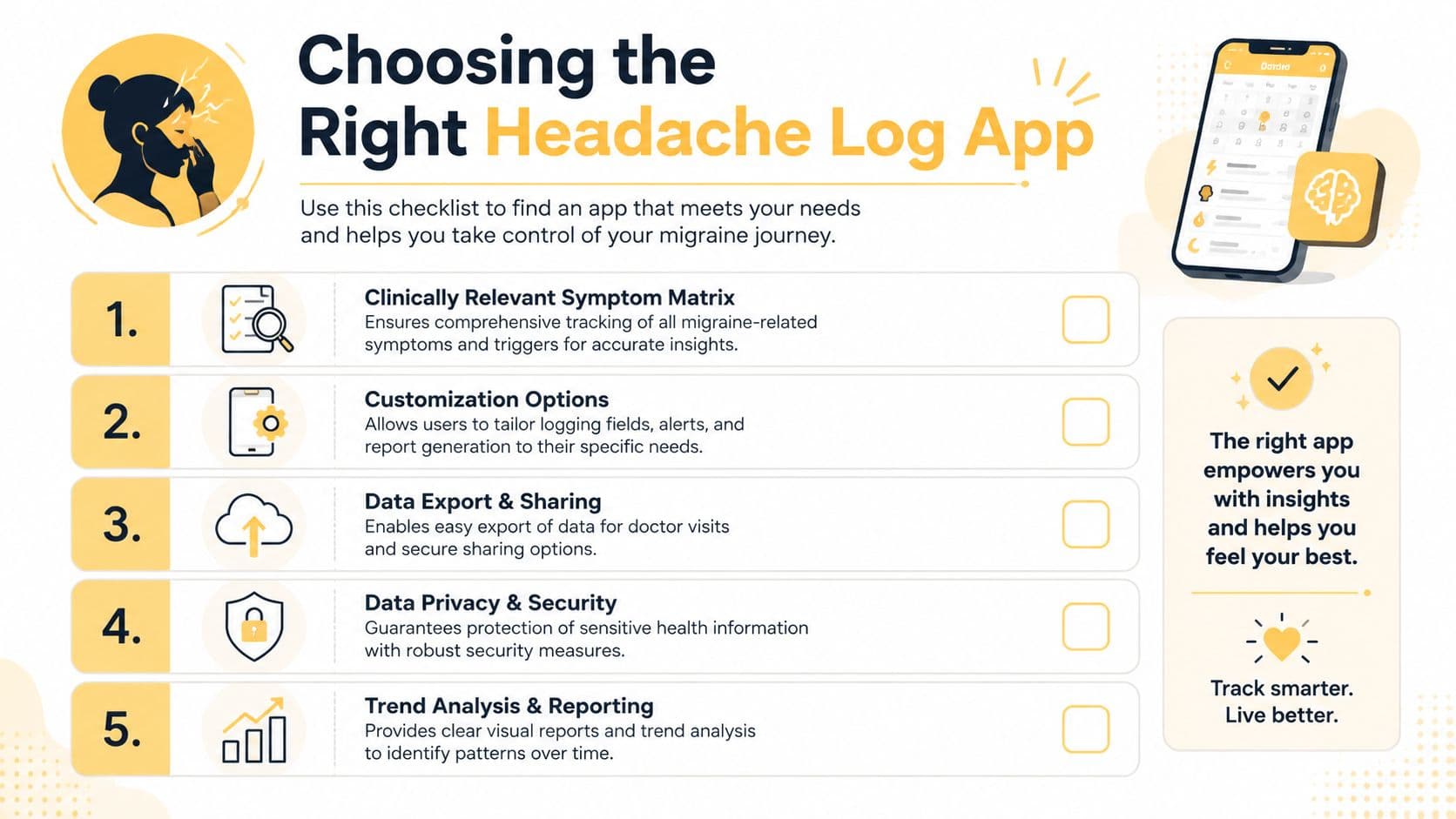
What the app must capture
An ideal headache diary app should measure clinically relevant headache variables, include customizable answer options, link multiple variables in reports, and allow data export, according to a clinical review of what makes a headache diary feasible and reliable.
Look for these basics:
- Attack timing: date, start time, end time, and duration.
- Severity: a simple scale such as 1 to 10.
- Symptoms: nausea, photophobia, phonophobia, aura, dizziness, neck pain, and other symptoms you commonly notice.
- Medication tracking: what you took and whether it helped.
- Trigger fields: stress, sleep changes, skipped meals, exercise, menstruation, weather, and any personal patterns you've noticed.
A practical guide from the Southeast Center for Headaches symptom tracking overview also highlights recording onset and end time, total duration, severity, symptoms, potential triggers, medication effectiveness, and menstrual cycle phases when relevant.
What separates useful from frustrating
The biggest trade-off is between detail and friction. If an app asks for too much every time, you won't use it when you're nauseated, light-sensitive, or trying to function at work. If it asks for too little, your reports won't help much later.
Practical rule: Pick the app you'll still use on your worst day, not the one that looks most impressive on your best day.
A few features make a real difference:
| Feature | Why it matters |
|---|---|
| Mandatory symptom flags | Clear symptom tagging helps separate migraine features from other headache types. |
| Custom fields | Your pattern may involve menstrual shifts, exercise, screen exposure, or travel. |
| Trend reports | You need linked data, not isolated entries. |
| Export options | Doctor visits go better when you can share a readable summary. |
| Environmental integration | Forward-looking risk is more useful than a diary that only documents the past. |
If you want an example of a tool built around tracking plus forecasting, Relief for migraine risk tracking on iPhone shows the direction many users now want: personal logs combined with weather and environmental context.
Initial Setup Process
Rushing setup often results in spotty data and vague reports. A better approach is to spend a few extra minutes upfront so the app can track what matters to you.
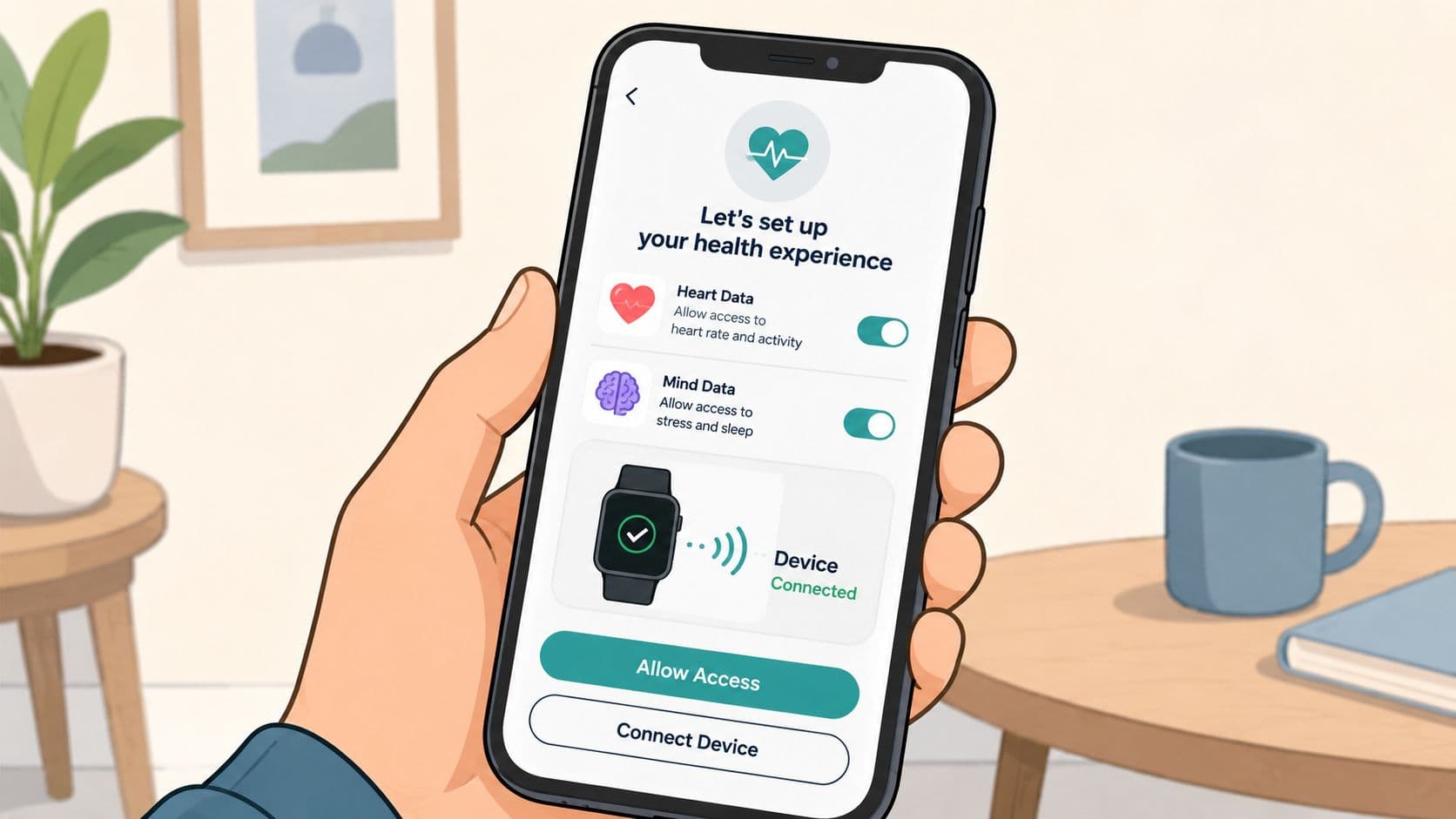
Start with the data sources that matter
When the app asks for permissions, think in terms of usefulness rather than granting everything automatically.
Turn on the permissions that support pattern recognition:
- Health data access: helpful if you want sleep, heart rate, or activity trends alongside attacks.
- Location access: useful for local weather, air quality, and pollen data.
- Notifications: worth enabling if reminders help you log consistently.
- Wearable access: practical if you use an Apple Watch or another device that makes quick entries easier.
If a permission doesn't support your actual goal, skip it for now. You can always add it later.
Build a symptom matrix you can actually use
Your symptom matrix is the set of symptoms and related fields that appear every time you log. Keep it detailed enough to be meaningful, but short enough to complete when you feel awful.
A good starting setup includes:
- Pain severity on a simple scale.
- Core symptoms such as nausea, photophobia, phonophobia, aura, and dizziness.
- Attack stage notes if your app supports prodrome or postdrome.
- Medication entries you use often, saved as defaults for quick taps.
- Common personal triggers you suspect, even if you're not sure yet.
Start with the basics, then add more only if you keep using them. The American Migraine Foundation headache diary guidance emphasizes beginning with whether a headache occurred, its duration, and how much it affected your ability to function, then building outward into symptoms and triggers.
When setup is done well, later analysis feels clearer because you're comparing like with like instead of a pile of inconsistent notes.
If your app supports separate labels for headache and migraine, use them carefully. Migraine and headache aren't interchangeable, and blurry labels lead to blurry trends.
Efficient Logging Practices
A new user usually does well for the first few days. Then a real migraine hits at work, in the car line, or at 2 a.m., and the app suddenly asks for too much. That is the point where a logging habit either becomes practical or gets abandoned.
Speed matters because migraine symptoms reduce attention, tolerance for screens, and patience for choices. A good routine protects your future data without asking too much from you during an attack.
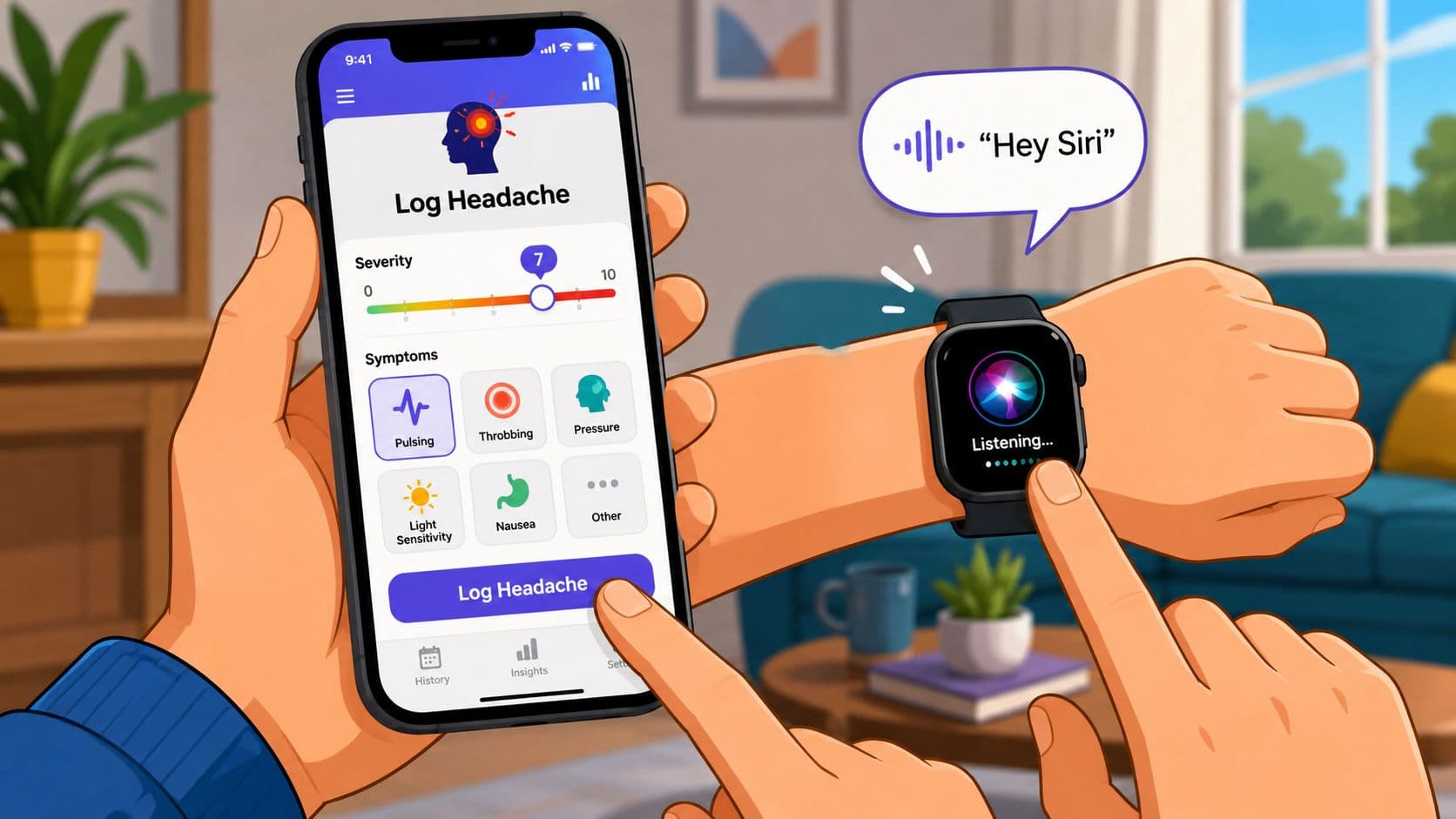
Make logging possible during a real migraine
Use a two-pass method.
The first pass should take seconds. Log only the details that are hard to reconstruct later:
- Start time or rough onset window
- Current severity
- Main symptoms
- Medication taken, if any
Then come back when the worst has eased and fill in context that supports pattern finding:
- Possible trigger exposures
- Sleep disruption
- Stress load
- Meals skipped or delayed
- Menstrual or hormonal timing
- Anything unusual about that day
This trade-off matters. If you force yourself to complete every field in the moment, you will skip entries. If you log nothing but “headache,” later analysis gets muddy. The middle ground is what works.
Save one default entry for your most common attack pattern. Edit only what changed.
Fast entry tools help, but consistency is the primary goal. Voice input, shortcuts, and wearable prompts are useful if they remove taps. If they create setup work you never maintain, keep the system simpler.
A short demo can help you picture what fast logging should feel like.
Use a short nightly review
A brief evening review cleans up your log while the day is still fresh. I usually tell clients to treat this as a chart correction, not journaling.
Check four things:
- Timing: adjust start or end time if you entered it quickly earlier
- Symptoms: add aura, nausea, light sensitivity, sound sensitivity, or dizziness if you missed them
- Response to treatment: helped, partly helped, wore off, or did not help
- Context: note anything that could matter later, especially exposures you may want to match against weather, pressure shifts, pollen, sleep debt, or activity
That last part gets overlooked. If your goal is forecasting, not just record-keeping, clean timestamps and brief context notes matter more than long diary entries. They give your app a better chance of matching your personal history with environmental data in a way that is useful later.
Keep the review under two minutes. If it takes longer, cut fields until the habit holds. A shorter log you complete is better than a perfect template you avoid.
Integrating Environmental and Health Data
Symptom-only tracking can show patterns, but it often misses the context that makes migraine feel unpredictable. The question many people want answered isn't just “What triggered me last week?” It's “What is my risk later today?”
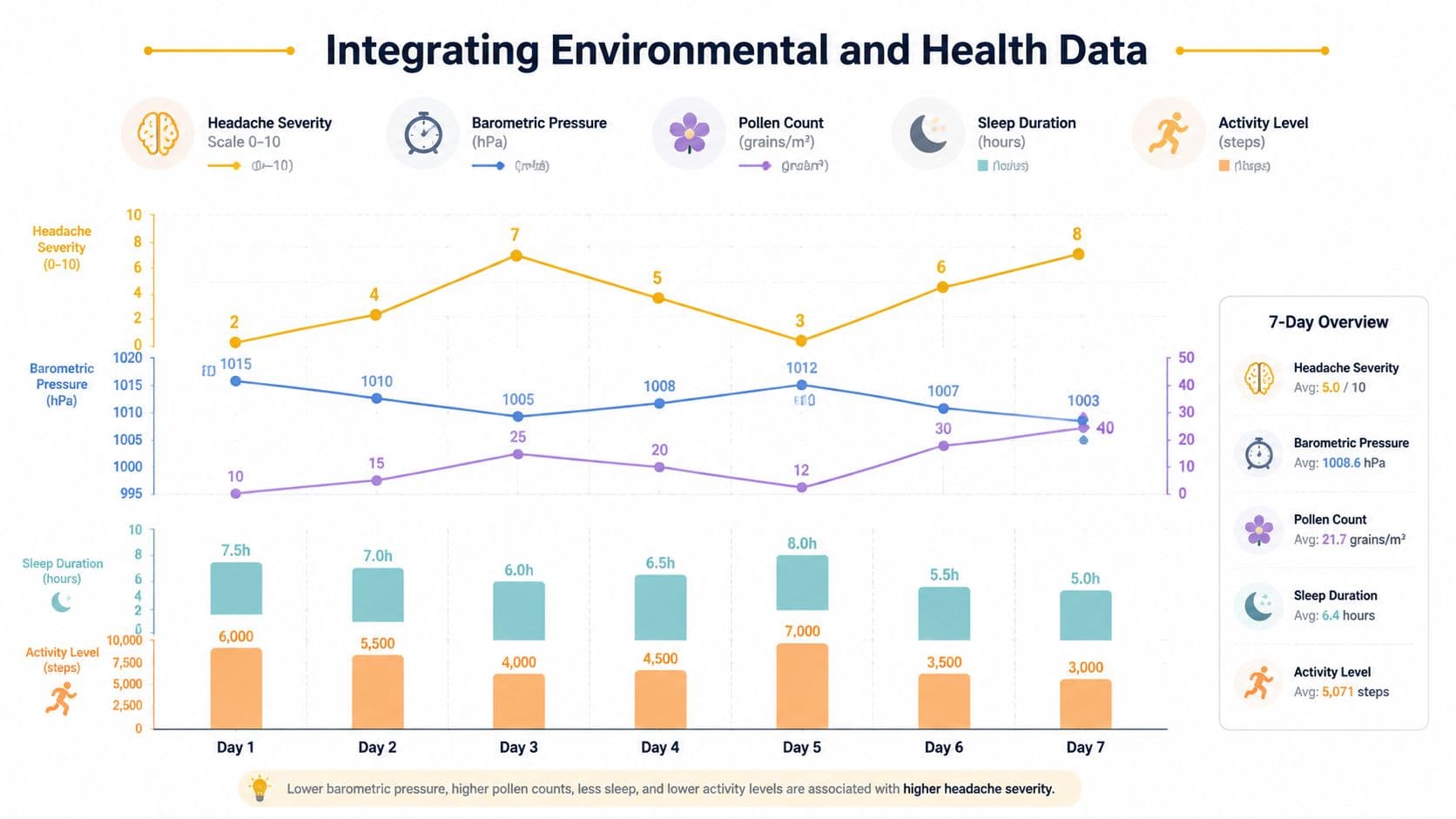
Why weather data needs to be specific
Not all environmental data is equally useful. Generic weather summaries are often too broad. “Cloudy” or “rain likely” doesn't tell you much if your pattern is tied to pressure shifts, poor sleep, and high pollen together.
Technical benchmark data shows that apps using real-time barometric pressure sensors have 2.4x higher correlation accuracy between pressure drops below 5 mmHg and migraine onset than apps using only generic weather forecasts, according to the benchmark description for sensor-based migraine tracking.
That matters because barometric pressure is one of the hardest triggers to track manually. Individuals find it challenging to feel or measure those shifts precisely in daily life.
How to check whether your data is trustworthy
Environmental integration is only useful if the incoming data is clean and your logging is consistent enough to compare against it.
Use this checklist when you review the app:
- Pressure source: Does it use a real-time local sensor or a reliable local data feed?
- Location accuracy: Is the app using your current area, not a stale location from days ago?
- Time alignment: Do logged attacks line up with the environmental timeline, or are entries too vague to match?
- Personal context: Are sleep, activity, and symptoms being tracked in the same system, so patterns can be linked?
A forecast model also becomes more useful when it combines multiple signals. Sleep loss, activity changes, pollen, humidity, air quality, and pressure shifts may matter more together than alone.
Most headache diary advice still focuses on retrospective tracking. That's useful, but it leaves a major gap for people who want to plan the next few hours, not just review the last few weeks.
Analyzing Trends and Forecasts
You log for weeks, then one day the pattern starts to show up before the attack does. A rough night of sleep. A pressure drop by late morning. Symptoms that tend to start between 2 and 4 p.m. That is the point where a headache log app becomes useful for planning, not just record-keeping.
Pattern analysis takes enough history to separate random bad days from repeatable risk. As noted earlier, short logging windows are often too thin to support reliable trigger patterns, so early results deserve caution. I usually tell people to treat the first stretch as collection mode. The full value shows up once the app has enough entries to compare your symptoms, routine, and environment side by side.
What to look for after a few months
Stop chasing a single cause for each migraine. In practice, risk usually builds from a combination of factors.
Useful patterns often look like this:
- attacks that cluster after short sleep and falling barometric pressure
- harder days when pollen is high and meals are delayed
- a repeat start window, such as late afternoon or just after commuting
- fewer attacks on days with steadier routines, regular hydration, and fewer skipped breaks
The key step many guides miss is forecasting from combined signals. Personal history matters most, but it gets much more useful when the app layers in real-time environmental data. A pressure change on its own may mean little. That same pressure change after poor sleep, during peak pollen, and within your usual symptom window is much more actionable.
Current coverage of headache log apps still leans heavily toward documenting the past, while proactive, hour-by-hour forecasting remains underexplained in most guides and reviews, as discussed in analysis of the forecasting gap in migraine diary apps.
How to use forecasts without overreacting
A forecast is a risk estimate. Use it to make smaller, smarter decisions.
If your app flags a higher-risk afternoon, common adjustments include:
- doing your most demanding task earlier in the day
- protecting your meal break instead of working through it
- reducing extra screen strain if that shows up in your history
- carrying medication, water, sunglasses, or other support tools before travel
Low-risk periods matter too. They are often the best window for exercise, errands, or plans that are harder to cancel.
This approach works best when you stay practical. Forecasts should widen your choices, not make you monitor yourself all day. The goal is not perfect prediction. The goal is to spot enough repeatable patterns that you can prevent some attacks, reduce the severity of others, and plan with more confidence.
Managing Privacy and Exporting Data
A headache log app can hold a surprising amount of sensitive information. Symptoms, medication use, cycle tracking, location-based weather data, and daily routines all sit in one place.
That makes privacy settings worth checking before you need to share anything.
What to protect
A reasonable privacy review includes:
- whether your data is stored only on-device or also in the cloud
- whether third-party integrations are optional
- whether exports require your approval each time
- whether the app explains sharing in clear language rather than vague promises
Research indicates that 64% of users want to share diary data with doctors, but only 36% of apps permit direct sharing with medical providers, often with authorization hurdles or weak export support, according to the study on electronic headache diaries and physician data sharing.
What makes a doctor report useful
A useful report isn't just a screenshot of a chart. It should help a clinician see the pattern quickly.
The best export usually includes:
- frequency over time
- severity trends
- duration
- medication use
- symptom patterns
- trigger correlations
- clear dates
If your app offers PDF and CSV export, each has a role. PDF is easier for appointments and email. CSV is better if a clinic wants structured data.
This article is for informational purposes and is not medical advice. Consult a healthcare provider for personalized guidance.
Maintaining Long Term Predictive Accuracy
The value of a headache log app doesn't come from a perfect first week. It comes from staying consistent long enough for your own patterns to become obvious.
In a study of regular daily users of an electronic headache diary app, monthly migraine and headache days dropped from 9.42 days in the first month to 6.39 days after 6 months, a 32.2% reduction, with benefits persisting for users who kept up regular use, according to the JMIR study on electronic headache diary outcomes over time.
Keep the inputs clean
Long-term accuracy depends on boring habits more than clever features.
A few habits help:
- Use the same symptom labels consistently. Don't switch between vague and specific wording every week.
- Archive tags you never use. Too many old categories create clutter.
- Log baseline days if your app supports them. A diary that only records bad days can distort the pattern.
- Correct obvious mistakes quickly. Wrong times or duplicate entries make trend lines less trustworthy.
Review and refine once a month
Once a month, open your reports and ask three questions:
- Are the same triggers still showing up, or has the pattern shifted?
- Are there tags I keep ignoring that should be removed?
- Do I need a new field for something that now seems relevant, such as travel, menstrual changes, or exercise timing?
Clean data beats complicated data. A simple system you keep using will usually teach you more than a detailed system you abandon.
This guide is general information, not medical advice, and it isn’t a diagnosis. Talk to your doctor about your own headaches.