Migraine Forecast App Guide for Proactive Management
Learn how a migraine forecast app predicts your attack risk, optimizes tracking, and helps you plan ahead with evidence-based tips and insights.
In this guide
You open your calendar, see a busy afternoon, and wonder the same thing you've probably wondered before: can a migraine forecast app warn you in time to do anything useful? The honest answer is yes, sometimes, but not with perfect certainty. The best apps work less like a crystal ball and more like a weather alert system for your nervous system. They estimate risk so you can plan, track, and respond earlier.
That matters because migraine is not the same as a headache. A migraine attack can involve prodrome (early warning symptoms before pain starts), aura (temporary neurological symptoms such as visual changes for some people), and photophobia (light sensitivity), along with nausea, sound sensitivity, and exhaustion before or after the pain phase. If your attacks seem to come out of nowhere, a forecasting tool can help turn “why is this happening again?” into “what pattern am I missing?”
This article is for informational purposes and is not medical advice. Consult a healthcare provider for personalized guidance.
- Personal data comes first
- The app compares your logs with your environment
- The forecast becomes a risk signal
Understanding Migraine Forecast App
When migraine hits without warning, it can make you feel like you can't trust your own schedule. You may cancel plans, miss work, or push through symptoms until everything gets worse. A migraine forecast app tries to reduce that uncertainty by estimating when your risk is rising.
A migraine forecast app is like a weather app for your head. A regular weather app doesn't guarantee rain at your exact doorstep, but it helps you decide whether to carry an umbrella. A migraine forecast app works in a similar way. It looks at signals linked to your attacks and gives you a practical heads-up.
A simple diary records what already happened. A forecast app tries to answer a different question: what might happen next, and what should you do with that information? That shift matters if your goal is prevention planning rather than just record keeping.
What makes it different from a headache diary
A headache diary helps you log timing, intensity, symptoms, and possible triggers. That's useful. Forecasting builds on those logs by combining them with changing conditions such as sleep disruption, stress, weather shifts, air quality, or pollen.
Simple way to think about it: a diary looks backward. A forecast tries to look forward using the same history.
That's also why precise language matters. A tension headache and a migraine attack aren't interchangeable. Migraine can involve aura, nausea, sensitivity to light and sound, dizziness, and postdrome, which is the drained “migraine hangover” feeling after the main attack.
Why prediction matters in daily life
Value isn't just seeing a risk score. It's using that score to make small choices earlier in the day. You might protect your lunch break, avoid stacking stressful meetings, prepare a dark room, or review your treatment plan with your clinician.
If you want a practical example of how modern tracking and forecasting tools are evolving, ReliefMigraine's app overview shows how these tools can combine symptom logging with environmental signals.
How Migraine Forecasting Works
A migraine forecast app is often assumed to be mostly about weather. Weather can matter, but the engine is broader than that. A useful forecast comes from combining your own patterns with your local environment, then updating risk as those signals change.
A visual overview helps before we break down the moving parts.
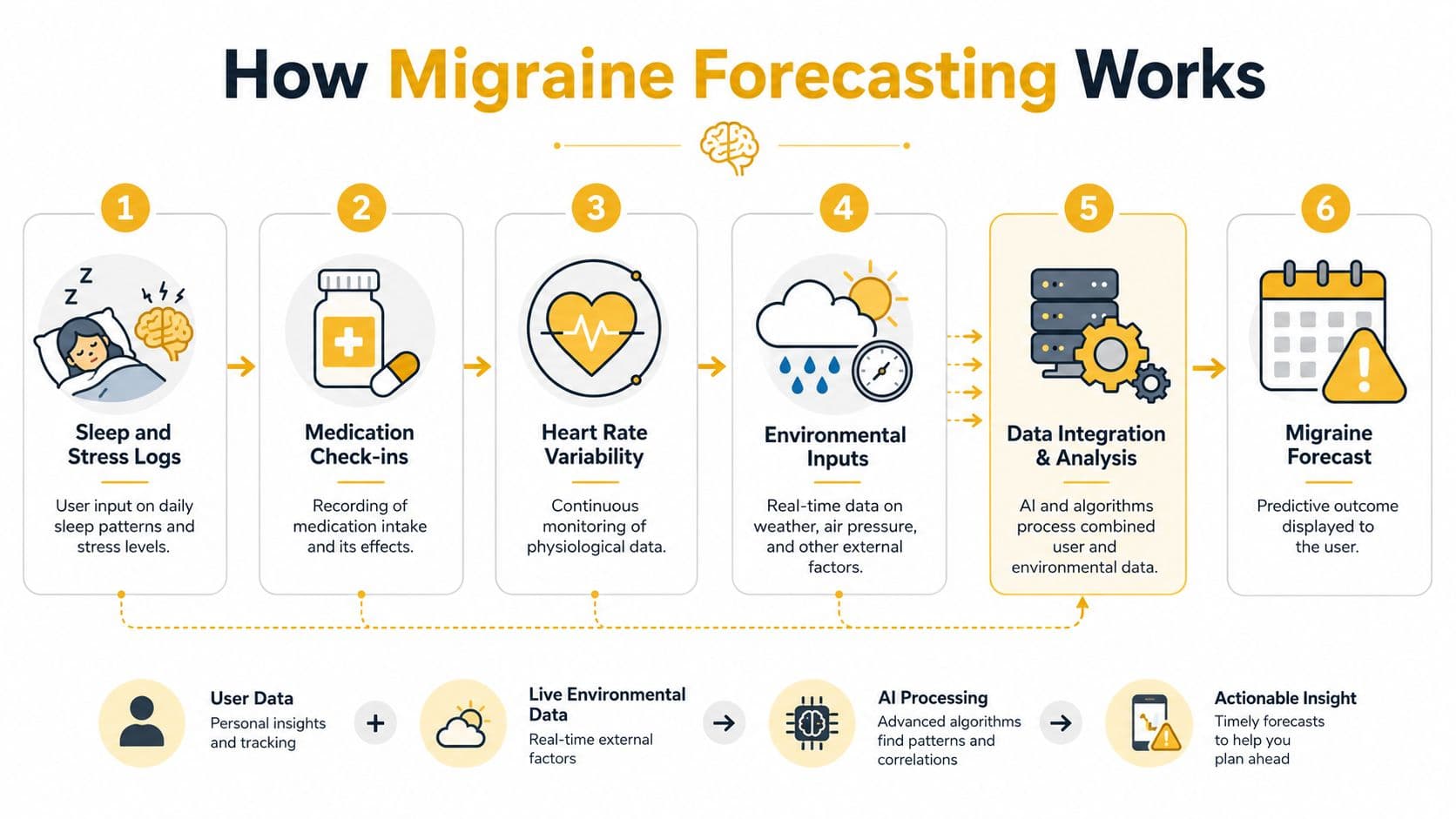
Personal data comes first
The app usually starts with the information only you can provide. That can include:
- Sleep patterns such as late nights, poor sleep, or irregular wake times
- Stress check-ins because stress often interacts with other triggers instead of acting alone
- Medication logs that show timing and whether symptoms changed
- Symptom details such as pain severity, nausea, aura, light sensitivity, or dizziness
- Wearable signals like heart rate variability, if the app supports them
Migraine is highly individual. Two people can live in the same city, face the same storm front, and have completely different outcomes. The app has to learn your pattern, not just a generic migraine pattern.
The app compares your logs with your environment
Environmental data becomes more useful when it's local and time-sensitive. According to weather-trigger guidance on migraine forecasting, effective algorithms must integrate multiple environmental streams and give special weight to rapid barometric pressure drops, often exceeding 1 to 3 mmHg within hours, along with humidity spikes and temperature fluctuations, to generate hour-by-hour risk probabilities.
That sounds technical, but the idea is simple. Broad regional forecasts can miss the conditions you feel. A nearby station may catch a pressure drop or humidity shift that a wider city-level forecast smooths over.
Forecast quality depends on local detail. If the app only knows “rain in your region,” it may miss the smaller pressure and humidity changes that matter to you.
Some apps also compare attacks against exposures over time using a correlation method. In expert forecasting language, that means calculating exposure hit rates. The purpose is to separate real trigger relationships from coincidence. If your attacks often follow a specific pattern, the app can gradually give that pattern more weight.
Here's a short explainer before the next layer of detail.
The forecast becomes a risk signal
Once personal and environmental inputs are combined, the output usually appears as an hourly or daily risk estimate. That estimate is not a diagnosis. It's a prompt for planning.
Some predictive modeling has shown promise. The TRACE approach forecasted about 70% of migraine episodes before onset while maintaining around 60% specificity for predicting no-headache days, according to TRACE migraine modeling research. But that doesn't mean every commercial app performs at that level for every person.
What matters most is whether the app keeps learning from your history. A fixed weather chart can warn you about a storm. A personalized forecast can learn that storms only matter when they follow poor sleep, high stress, or other changes in your routine.
Benefits and Limitations of Forecast Apps
Forecast apps can be useful, but they're not magic. The strongest reason to use one is practical: a warning may help you act earlier. The strongest reason to stay cautious is scientific: personalized hour-by-hour prediction is still an evolving field.
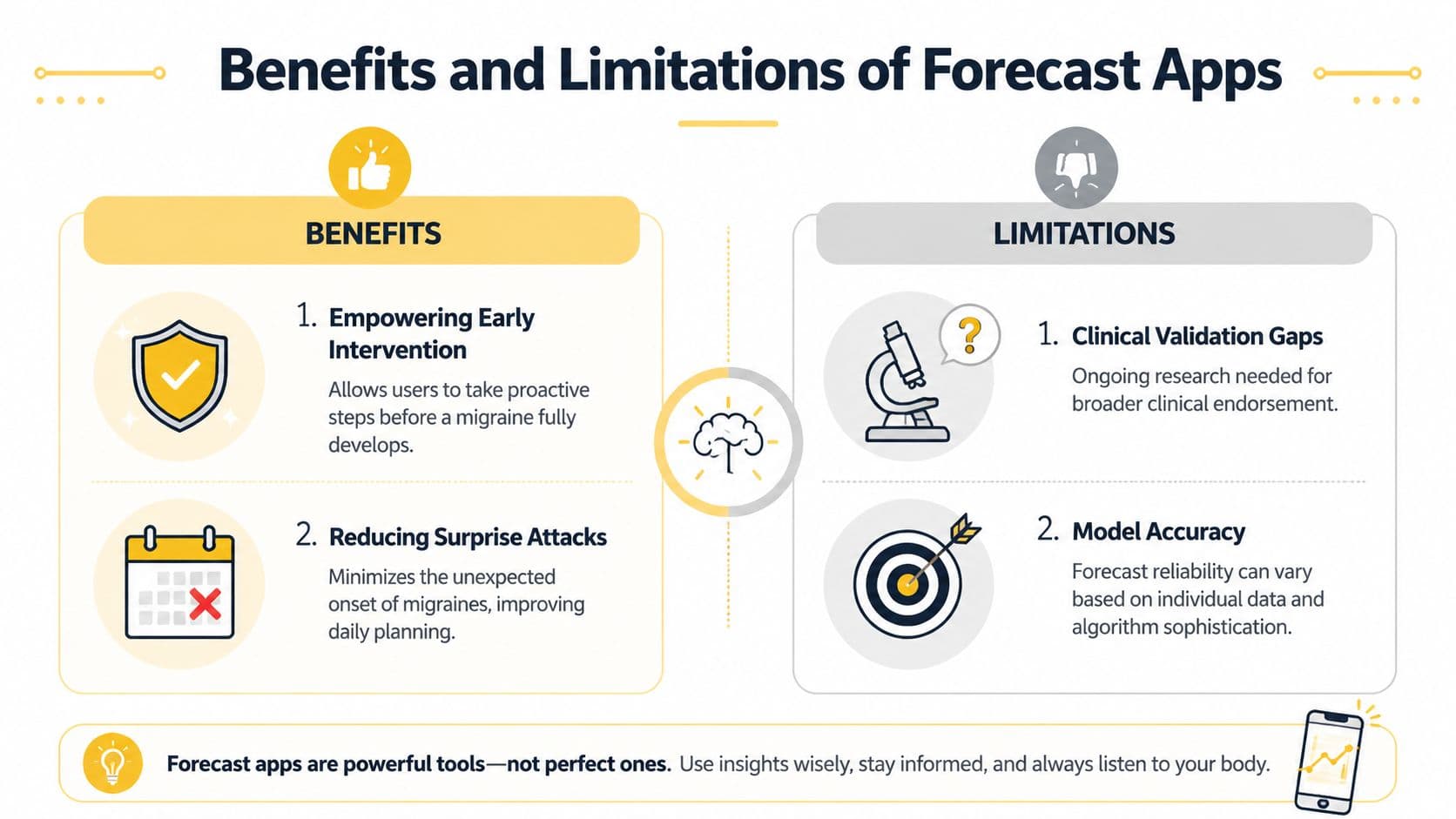
Where these apps can help
Clinical research on electronic headache diary apps found that regular use can reduce migraine frequency and intensity over time, and participants remained engaged on about 77% of days during a 24-week period in a JMIR study on migraine app use. That doesn't prove every forecast feature works equally well, but it does support the broader idea that consistent tracking can help people manage migraine better.
For everyday life, the benefits usually look like this:
- Earlier planning so you can protect important hours
- Fewer surprises when you've noticed a pattern before symptoms escalate
- Better clinical conversations because your logs are clearer and more specific
- More self-awareness about the difference between a random bad day and a recurring trigger pattern
Where the evidence is still limited
Many readers understandably become skeptical. A 2024 peer-reviewed study found that smartphone models predicting episodic migraine risk performed inadequately for practical use, scoring only slightly better than chance in within-person discrimination, as reported in The American Journal of Managed Care coverage of the study.
Research also suggests that the realistic ceiling for personalized 24-hour migraine forecasts sits in the 0.60 to 0.70 AUC range across prospective studies, with models often reaching about 0.66 after 30 days of personalization, according to Hermly's review of forecast accuracy benchmarks. So if you see claims of near-perfect prediction, be careful.
A forecast should help you prepare, not convince you that your body has become fully predictable.
When to get urgent medical care
A forecast app should never delay emergency care.
Seek immediate medical attention if you have:
- A sudden severe headache that feels very different from your usual attacks
- Headache with fever or a stiff neck
- New neurological changes such as weakness, confusion, trouble speaking, or vision loss
- Headache after a head injury
This article is for informational purposes and is not medical advice. Consult a healthcare provider for personalized guidance.
Key Features to Evaluate in a Forecast App
Not every migraine forecast app deserves your trust. Some tools look polished but make vague promises. The better approach is to judge them by what they help you do, how clearly they explain their data use, and whether they fit the way you live.
What matters more than flashy promises
Start with usability. If logging feels annoying, you probably won't keep doing it. That matters because sustained use is part of what makes the tool valuable. As noted earlier in the evidence base, app engagement can stay high when tracking is easy and consistent.
Then look at the forecasting claims. You want realistic language, not certainty theater. A trustworthy app should frame forecasts as risk estimates, not guarantees.
A few areas deserve close attention:
Accuracy language
If an app promises extreme precision, pause. Current research supports more modest performance ranges, not perfect prediction.Privacy protections
You're logging health information. Check whether the company explains storage, sharing, and export clearly.Fast logging
Migraine often makes screens, noise, and decisions harder. The app should let you log symptoms in seconds, not force a long form when you're light-sensitive.Useful integrations
Calendar sync, wearable input, and environmental overlays can make the forecast more actionable.Action support
The best app doesn't stop at “high risk.” It helps you connect risk to routine.
Feature Comparison Table
| Feature | Key Considerations |
|---|---|
| Predictive model | Does the app describe the forecast as a probability rather than a certainty? Does it explain what data shapes the forecast? |
| Symptom logging | Can you record severity, aura, photophobia, nausea, triggers, and medication quickly during or after an attack? |
| Environmental data | Does it use local weather and related signals instead of only broad regional summaries? |
| Personalization | Does the tool adapt to your history over time, or does it mostly show a generic trigger chart? |
| Privacy | Can you easily understand what health data is stored, exported, or shared? |
| Wearable support | If you use a smartwatch or health platform, does the app connect in a way that's actually useful to you? |
| Calendar support | Can you place alerts around work, school, travel, or caregiving responsibilities? |
| Review tools | Does the app help you spot patterns you can discuss with a clinician rather than leaving you with raw logs only? |
Practical Tips for Using Forecast Apps Effectively
A common problem isn't lack of data. It's what to do after you see the warning. Research shows that people often stay engaged with headache diaries over time, but their use of behavioral self-management tools such as forecasting and prevention planning decreases without clear guidance, according to a review of migraine app engagement patterns.
That gap is where a lot of frustration lives. You check the app, see increased risk, and then freeze because nothing in your schedule feels movable. The answer usually isn't a dramatic lifestyle reset. It's a few small pre-decisions.
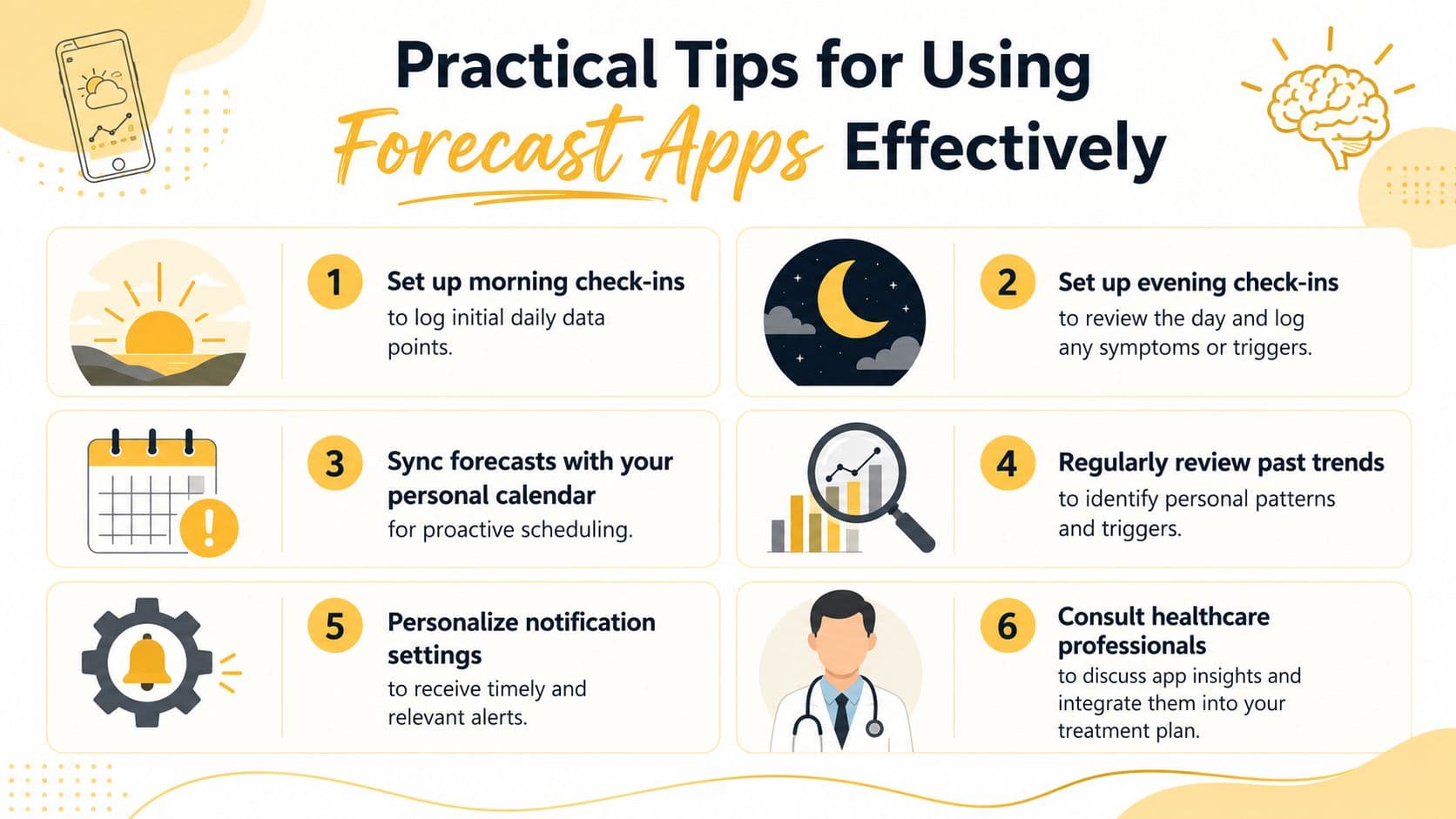
Turn risk into a plan
Try using the forecast in a concrete, repeatable way:
Check once in the morning
Look for your higher-risk windows before the day gets busy. If the afternoon looks rough, protect the basics early. Eat regularly, hydrate, and avoid stacking optional stress.Use one evening check-in
Log what happened while it's still fresh. Include symptoms like aura or photophobia, not just pain level.Put forecast alerts on your calendar
If a high-risk window overlaps with a meeting, commute, workout, or childcare task, add a buffer before it. That turns the app from information into scheduling help.
Practical rule: don't ask the forecast to make your decisions for you. Use it to trigger a small backup plan.
Build small habits that stick
You don't need perfect tracking. You need tracking that survives real life.
- Review patterns weekly instead of obsessing over every single alert. Migraine patterns become clearer over time.
- Adjust notification settings so the app doesn't become background noise.
- Choose one prevention habit for high-risk periods, such as a meal reminder, a screen break, or a quieter commute plan.
- Bring your logs to appointments if you're working with a clinician on diagnosis or treatment adjustments.
Some people also get stuck because they expect forecasting to remove uncertainty completely. It won't. What it can do is reduce the number of days that feel random and help you catch earlier phases of an attack.
A useful mental model is this: if your app flags risk and you do one helpful thing sooner than usual, the forecast already did its job.
Real World Example of Relief in Action
A forecast becomes useful when it changes a real day, not when it just produces a graph. Here's what that can look like with Relief.
A workday with an elevated risk alert
You wake up feeling mostly fine, but not quite solid. There's mild neck tension, and you slept poorly. Relief shows a higher-risk window later in the afternoon based on your recent logs and changing local conditions.
You've got an important meeting at 2 PM. Instead of discovering symptoms halfway through it, you get a heads-up early enough to plan. You move one nonessential task, make sure you eat before noon, and keep your early afternoon lighter.
Later, symptoms start building. You open the app and log severity, symptoms, possible triggers, and medication in a few taps. The point isn't just to document pain. It's to give the system better context for the next forecast.
Why the pattern matters more than one bad day
Over time, Relief's dashboard can place your personal history next to weather, air quality, and related environmental shifts so the signal becomes easier to see. That matters because expert forecasting relies on a correlation engine that calculates exposure hit rates to separate likely trigger relationships from random overlap, as described in MigraineZen's app description of exposure hit rates.
In plain language, that means the app can help answer a question many people wrestle with: “Was humidity really a trigger, or did I just notice it because I was already stressed and underslept?” Over time, trend summaries can also make progress visible through things like migraine-free streaks, total migraine hours, average attack time, and shifts in severity.
That doesn't make the forecast perfect. It makes it more useful.
Conclusion
A migraine forecast app can help you plan ahead, spot patterns, and make your day a little less unpredictable. It works best when you treat it as a support tool, not a verdict. The science behind forecasting is promising in places and limited in others, so the practical goal is earlier awareness, not total certainty.
This guide is general information, not medical advice, and it isn’t a diagnosis. Talk to your doctor about your own headaches.